
The VibeStarter Plus and Pro subscription
You take out and change the subscription from the app. Cancellation is also accessible from the account area on the website.
The VibeStarter subscription gives you AI credits every month, to generate images, 3D models, music and sound effects without storing an API key. It is optional: the app works without it, and top-up credits can be bought without a subscription.
The offer screen sums it up this way: “3D models, thumbnails, icons and music for your game, generated inside VibeStarter.”
The two tiers
Section titled “The two tiers”| Plus | Pro | |
|---|---|---|
| Price | €29/month incl. VAT | €59/month incl. VAT |
| Credits per month | 2,000 | 5,000 |
| Features | All | The same |
The app says so on screen: “Same tools, no API key: only the credits change.” The top tier carries the “Recommended” badge.
The subscription does not replace your AI coding subscription, and its credits are not used to make your agents work. See What VibeStarter costs.
Taking out a subscription
Section titled “Taking out a subscription”- In the app, open subscription from the sidebar, or from settings then the subscription tab.
- On the card for the tier you want, click Choose Plus or Choose Pro.
- The “Before you pay” window restates the purchase and its price, then asks you to tick the immediate access checkbox. Click Continue to payment.
- Your browser opens the payment page. The app shows “Payment in progress in your browser. Your balance updates when you come back.”
- After payment, the credits arrive within seconds: the app checks every three seconds for three minutes.
- If nothing arrives after three minutes, the app shows “No payment detected” and the Check again button. A payment page you closed has charged nothing.
The immediate access checkbox is never ticked in advance, and Continue to payment stays greyed out without it. The price shown is the one the app receives from VibeStarter; if it does not reach the app, the window names the purchase without an amount.
If the payment page does not open, a red banner at the top of the page says why, for example “Checkout is unavailable right now.” or “The payment service hit a temporary issue — try again in a moment.”
For 14 days after this first payment, you can withdraw and be refunded for the part of the credits you have not used: see Withdraw within 14 days.
The states of the Subscription page
Section titled “The states of the Subscription page”A single screen holds the whole subscription. What you see depends on the state of your account.
| State | When | What the app shows |
|---|---|---|
| The offer | Never subscribed, or subscription ended | One card per tier, with the price, “{{n}} credits a month”, “that's {{price}} per credit”, three counters (3D models, images and thumbnails, music and sound effects) and the “Choose {{tier}}” button |
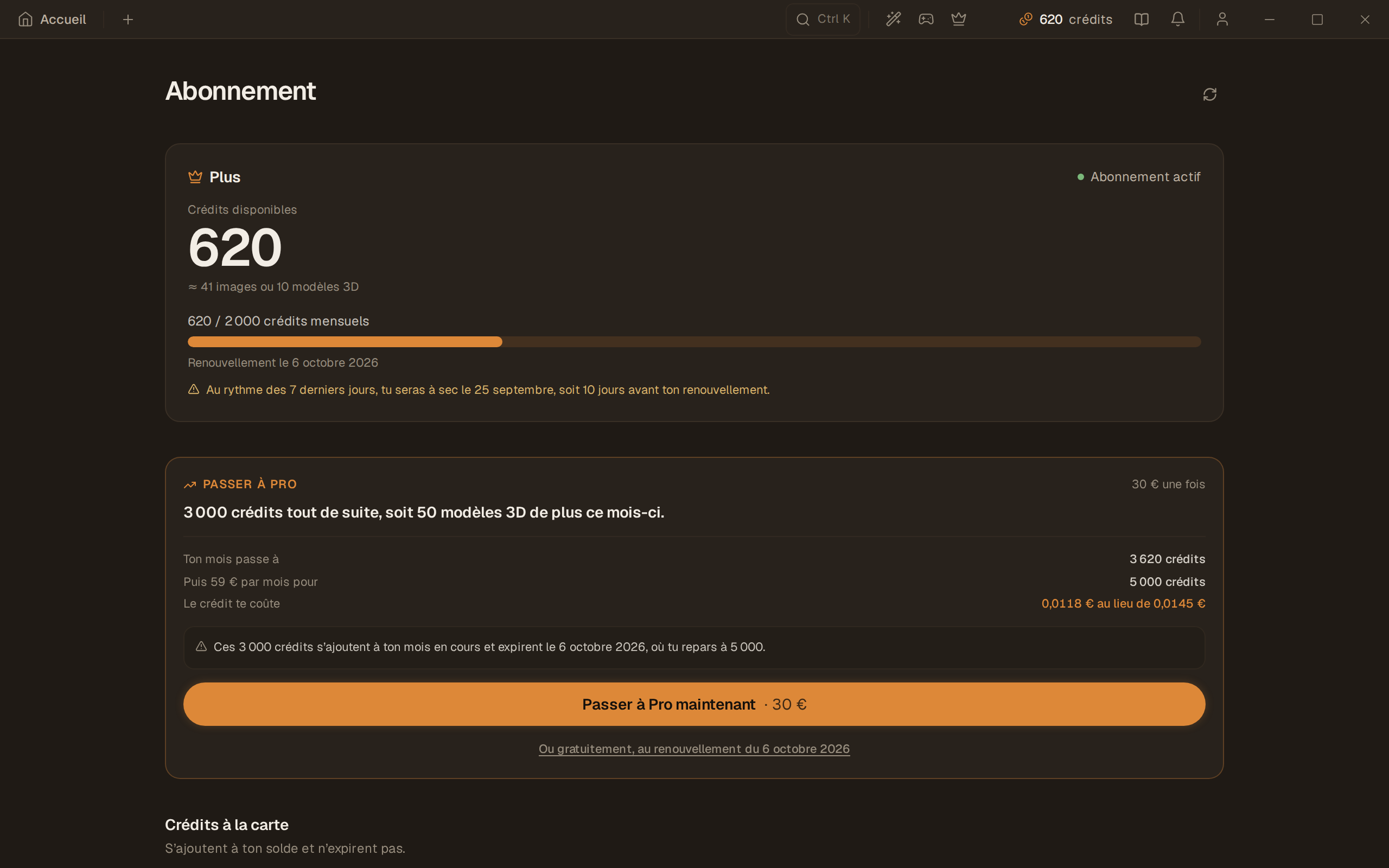
| Active subscriber | The subscription is in progress | “Subscription active”, “Available credits”, “{{sub}} / {{total}} monthly credits”, “+{{n}} top-up”, “Renews on {{date}}”, “This month with {{tier}}”, “Recent activity” and the fallback “Change tier or cancel” |
| Payment failed | The renewal did not go through | “Payment failed” — “Your subscription renewal payment failed and generation is suspended. Fix the payment via the link you received by email to reactivate it.” |
| Cancellation in progress | The request is kept and sent on | Processing is under way; the stop of renewals is not confirmed yet. |
| Cancellation accepted | The provider accepted the stop | Renewal is stopped; the update of the subscription may still be in progress. |
| Cancellation confirmed | The subscription status confirms the stop | The end of the period already paid stays displayed; there is no renewal any more. |
| Cancellation to check or failed | The result is uncertain or the operation did not complete | A message explains the check or the handling by the team; the cancel button is no longer offered. |
| Payment in progress | The payment page has just opened | “Payment in progress in your browser. Your balance updates when you come back.” |
| No payment detected | Three minutes with nothing arriving | “Nothing has come through for three minutes. If you closed the payment page, nothing was charged. If you just paid, give it a few more seconds and check again.” with Check again and Dismiss |
| Offers unavailable | The payment service cannot be reached | “Offers are unavailable right now. Try again in a moment.” |
If you hold top-up credits without being subscribed, the offer screen adds a “Top-up credits available” banner with the usable balance. Monthly credits left over from an old subscription are not counted there.
Changing tier is no longer offered after a cancellation request. If the renewal payment failed, you can still request cancellation: once it is accepted, it stops the next renewals, without restoring a period that was not paid.
The subscription lifecycle
Section titled “The subscription lifecycle”Changing tier
Section titled “Changing tier”Two paths, clearly separated on screen, under the Change tier or cancel fold.
Free, at the next renewal. Button “Move to {{tier}} at the next renewal”: “Free.
Nothing is charged today and your tier changes on…”. The current month is not affected.
Right away, by paying. Button “Move to {{tier}} now”, €30 once for 3,000 immediate
credits, then the subscription is repriced to the higher tier.
The app also offers to move down a tier when your use justifies it:
“Your last two full months spent {{last}} and {{before}} credits. {{tier}} gives {{n}} a month: you would pay less for the same use.”
The possible refusals are named: “No active subscription to change.”, “Fix your payment before changing tier.”, “You are already on this tier.”, “This tier is unavailable right now.”, and “The change could not be applied right away. We retry automatically — come back in a few minutes.”
If the app shows “Your account carries several active subscriptions. Write to us and we will sort it out by hand.”, write to support@vibestarter.pro.
Limits
Section titled “Limits”- Buying and changing tier happen in the app, on the subscription page. Cancellation is also available on the website, in your account area, on the Purchases and payments tab, on the subscription card.
- Monthly credits do not carry over from one month to the next.
- A failed payment blocks all generations, including with top-up credits.
- A cancellation request is not yet a confirmed stop: see Cancel, or what to do if a payment fails.
Frequently asked questions
Section titled “Frequently asked questions”Does Plus give me access to an AI for coding? No. It gives you asset generation credits. Your coding AI is still at your expense.
What is the difference between Plus and Pro? The monthly credit amount, nothing else.
What happens if I change my mind after opening the payment page? Closing the payment page charges nothing. The app records this in the “No payment detected” state.
Can I subscribe from the website? The website’s welcome page offers Activate VibeStarter Plus. Everywhere else, the subscription is taken out in the app.