
Connect VibeStarter to Roblox Studio
Your agreement is requested during setup; after that, the app keeps the plugin up to date on its own.
Roblox Studio remains the editor for your 3D world and the only place your game is published from.
VibeStarter connects to it through a plugin, VibeStarter Sync, which it installs for you after your
agreement. This page explains what the plugin does, how to check it, and how to remove it.
The plugin’s two roles
Section titled “The plugin’s two roles”The plugin does two different things, and mixing them up explains many questions.
Role 1 — it brings the code. The plugin receives your project’s code, already translated for
Roblox, and puts it into the open place. This is the only role that has a screen: a
VibeStarter Sync button in the Studio toolbar opens its panel. The details are in
Sync, explained.
Role 2 — it gives tools to the agents. The same plugin lets your agents read the place, run code, start a test and take captures of it. This role has no screen: it does not appear anywhere in Studio. The details are in What agents can do in Studio.
Three things to know right away
Section titled “Three things to know right away”- Studio only receives code that compiles. As long as compilation fails, Studio keeps the last valid version. This is not a fault.
- Sync goes in one direction only. Anything you change by hand in a synced script will be overwritten. Code is edited on the VibeStarter side.
- Publishing your game is an action you take in Studio. VibeStarter never publishes your place; it then records which version is online.
Before you start
Section titled “Before you start”- Roblox Studio installed on your computer, with your Roblox account signed in.
- An open place in Studio, saved to Roblox at least once.
- Nothing to turn on in Studio: the plugin has no settings.
Give your agreement
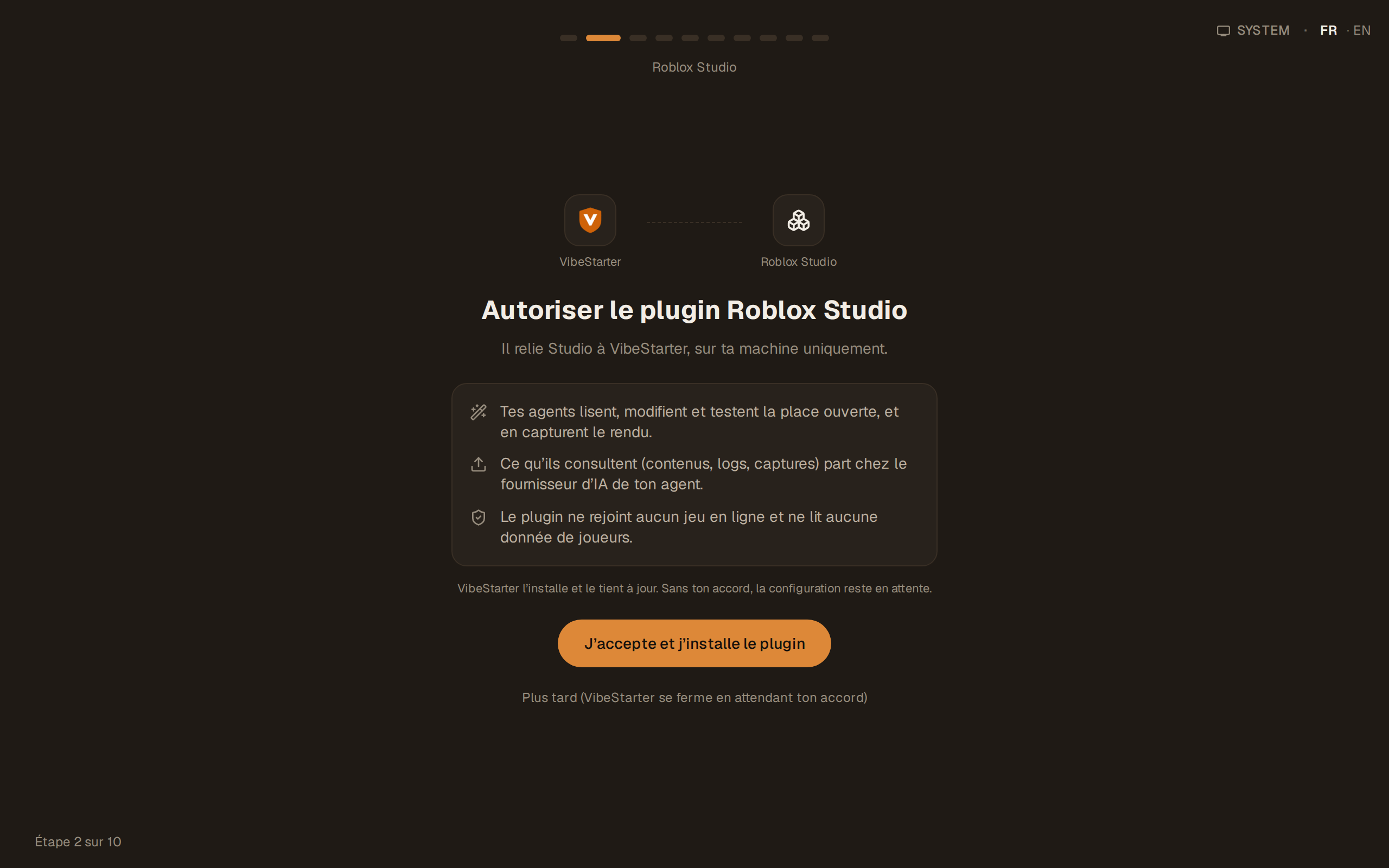
Section titled “Give your agreement”The Roblox Studio step of the setup asks for your agreement before installing anything.
- The screen shows Allow the Roblox Studio plugin: “It connects Studio to VibeStarter, on your machine only.”
- Read the three points that follow: “Your agents read, edit and test the open place, and capture its rendered view.”, “What they consult (content, logs, captures) goes to your agent’s AI provider.” and “The plugin never joins online games and never reads player data.”
- Click I agree — install the plugin. The app puts the plugin in Roblox Studio’s Plugins folder and moves to the next step. The connection with Studio is checked later, when you open your project.
- If Studio was open during the installation, close it and reopen it so that it loads the plugin.
The Later (VibeStarter closes until you agree) button closes the app: without your agreement, the setup stays pending. If the installation fails, the message is “Plugin setup could not be confirmed. Check access to the Roblox Studio Plugins folder, then try again.”
Where the plugin is installed
Section titled “Where the plugin is installed”The plugin is placed in the Plugins folder of Roblox Studio, under your
local application folder.
The plugin is placed in the Roblox/Plugins folder in your Documents.
VibeStarter creates this folder if it does not exist yet.
The plugin keeps itself up to date
Section titled “The plugin keeps itself up to date”After your agreement, the app checks and updates the plugin each time it starts. You do not have to download anything.
A Studio window that stayed open during an app update still uses the old plugin: it will not be able to connect. The app tells you instead of running in circles — “Sync plugin out of date — relaunch Roblox Studio”, or “Plugin updated — restart Roblox Studio to load it”. In both cases, close Studio and reopen it.
Check and repair
Section titled “Check and repair”Open Settings → Workspace → Roblox Studio plugin. The card shows the state of the plugin:
| What is shown | What it means |
|---|---|
| “Plugin installed in Studio’s Plugins folder.” | the file is in place, no Studio window is attached |
| “Plugin installed and connected to 1 open Studio window.” (or N windows) | everything works |
| “Plugin not installed. Agents cannot see or act in Studio.” | nothing is in place: use the repair |
| “Studio tools not loaded yet: syncing works, but agents cannot act in Studio until VibeStarter downloads them from its server. Repair retries now.” | the code arrives, but the agents’ tools are missing; the “Reason: …” line says why. Check your Internet connection, then use the repair |
| “Studio’s Plugins folder is not reachable from this machine, so there is nothing to install or remove here.” | the app cannot find the Roblox Studio Plugins folder |
The Check and repair the plugin button puts the plugin back in place. After the repair, the app shows “The installed plugin is up to date. If Studio is not connected yet, restart it.”
What the plugin reads, and where it goes
Section titled “What the plugin reads, and where it goes”The app states this when you give your agreement: “What they consult (content, logs, captures) goes to your agent’s AI provider.” and “The plugin never joins online games and never reads player data.”
In other words: what an agent looks at in your place goes to the AI provider you connected, just like the rest of your code. The plugin does not connect to your published game and does not see your players’ sessions.
Stop using the plugin
Section titled “Stop using the plugin”The plugin is a required component: the app states that it “keeps this component up to date automatically”, and there is no switch to turn it off.
- Windows: the VibeStarter uninstaller also removes the plugin.
- Mac: there is no uninstaller. Quit VibeStarter, then remove the plugin file from the
Roblox/Pluginsfolder in your Documents.
Limits
Section titled “Limits”- The plugin panel in Studio is in English: “VibeStarter connects this place on its own.”,
View changes. It is not translated and has no connection button. - The plugin has no settings screen. Everything is controlled from the app.
- An agent does not have access to your other Studio plugins (animation, VFX, third-party tools).
Frequently asked questions
Section titled “Frequently asked questions”Do I have to install the plugin myself? No. It is installed when the app starts, after your agreement, and it updates itself.
Do I have to turn on an MCP server in Roblox Studio? No. VibeStarter uses its own plugin; there is nothing to tick in Studio.
The app says Studio is open, but nothing connects. Restart Roblox Studio: this step fixes most cases. The rest is in The connection to Roblox Studio does not work.
I see “Studio closed” even though I closed it a long time ago. The app checks Studio regularly instead of waiting for a signal; a closed window takes a few dozen seconds to disappear completely from the list.